
The best office chair for full-time RV work is the one that fits the space you actually have, so the buying decision starts with a tape measure rather than a product page. A chair that earns five-star reviews in a house can block the aisle in a 30-foot trailer, roll across the floor on a sloped campsite, or have nowhere to go on a travel day. Work out your constraints first, and most of the shortlist chooses itself.
This method has four parts: measure the rig, rank the adjustments that matter in a small space, plan how the chair travels, and test the chair for two weeks before you commit.
Why the dinette bench breaks down after a few hours
A dinette is built for meals. The bench cushion is soft, the seat is deep, the backrest is whatever the wall behind it provides, and the table height is set for eating. None of that suits a seven-hour workday.

Several problems stack up:
- No lumbar support. Soft cushions let your pelvis tilt backward, so your lower back rounds as the day goes on.
- A fixed distance to the table. You cannot move the bench closer or further away, so you either lean forward to reach the keyboard or sit so far back that your arms stretch out.
- A table that is too low for a laptop. The screen sits well below eye level, which pulls your head and neck forward.
- No armrests. Your shoulders and forearms have nothing to rest on, and most people end up propping themselves on the table edge.
- One position. Without a seat that swivels, tilts or changes height, you have no way to shift your posture, and staying in one posture is what causes much of the stiffness.
A better chair solves some of this, and a better desk setup solves the rest. Both depend on your real dimensions, so measure before you shop.
Measure your RV first
Spend twenty minutes with a tape measure and a notepad. Write every number down, because you will compare them against product specifications later.
Floor space and clearance
Measure from the front edge of your desk or table to the nearest obstruction behind where you sit. That could be a bed, a cabinet, a refrigerator door’s swing, or the edge of a slide-out. This is the room your chair has to work in.
You need enough space to slide the chair back, stand up, and walk past it. If the clear distance is tight, you need a chair with a small base and no wide armrests.
Measure with the slide-outs both extended and retracted if you ever work with them in. A chair that fits when the slide is out may not fit during a stop at a campsite where you cannot extend it.
Also measure the width of the space on either side of the chair, and the width of your RV’s entry door and any hallway the chair has to pass through. A chair you cannot carry in is not an option.
Seat-to-desk height
This measurement decides whether a chair will work with your existing surface.
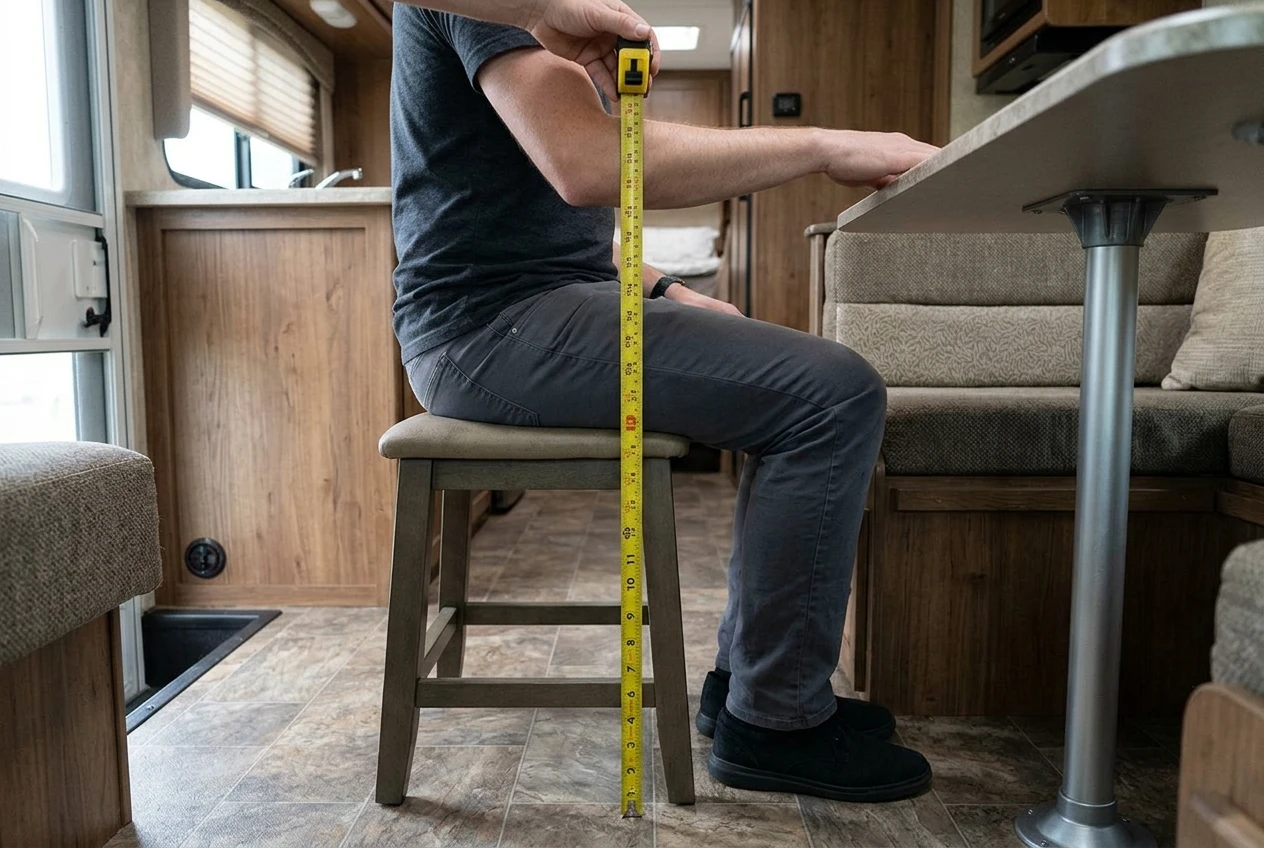
- Sit on any firm seat with your feet flat on the floor and your knees at roughly a right angle.
- Let your upper arms hang relaxed at your sides, then bend your elbows so your forearms are level with the floor.
- Measure from the floor to the underside of your elbow. This is your ideal working surface height.
- Now measure from the floor to the top of your actual desk or table, and from the floor to its underside.
If your table top is much higher than your elbow height, you need a chair that raises you, and probably a footrest. If it is lower, you need to raise the work surface with a stand, because lowering a chair does not help. The underside measurement tells you how tall a seat plus your thighs can be before you hit the table.
Floor surface and storage spot
Note what your floor is made of. Vinyl and laminate let hard casters roll freely, while carpet slows them. Slide-out floors can have a slight lip or seam.
Then decide where the chair will live on travel days and measure that space, including height. Do this before you buy. It is the most commonly skipped step and the one that causes the most returns.
The adjustments that matter most when space is tight
Office chair listings advertise a long list of adjustments. In a small rig, a few of them carry most of the benefit.
Seat height range. Check that the minimum and maximum seat heights cover the number you measured, with room to spare for a footrest or cushion. This one decides whether the chair works at all.
Seat depth. A seat that is too deep presses on the back of your knees and pushes you away from the backrest. Look for a seat that slides forward and back, or a seat shallow enough for your leg length. Most people should have a couple of fingers’ width between the seat edge and the back of the knee.
Lumbar support. This matters more than almost any other feature, since it fixes the main fault of the dinette. Adjustable support is best. Fixed support works if its shape matches your back, and you will find out during the test period.
Armrests. The useful kind either fold up, flip out of the way, or come off. Fixed, wide armrests collide with table edges and add width in a narrow space. If you type for long stretches, armrests that support your forearms help your shoulders, but only if they fit under your desk.
Backrest tilt and lock. Being able to lean back a little and lock the position gives you a second posture for reading and calls. Extreme recline mechanisms take up floor space behind the chair that you may not have.
Base and casters. A five-star base is stable but wide. Four-leg or compact bases take up less room. On a campsite that is not level, casters can roll the chair away from the desk. Look for locking casters, or for chairs that come with fixed glides, or plan to swap them.
Features you can usually skip in an RV are a headrest, a very wide seat, and heavy mechanisms with many levers. They add weight and bulk, which both cost you on travel days.
What to do with the chair on travel days
A loose chair in a moving rig can roll, tip, or slam into cabinets. Plan the securing method before you choose the chair, because it influences what you can buy.
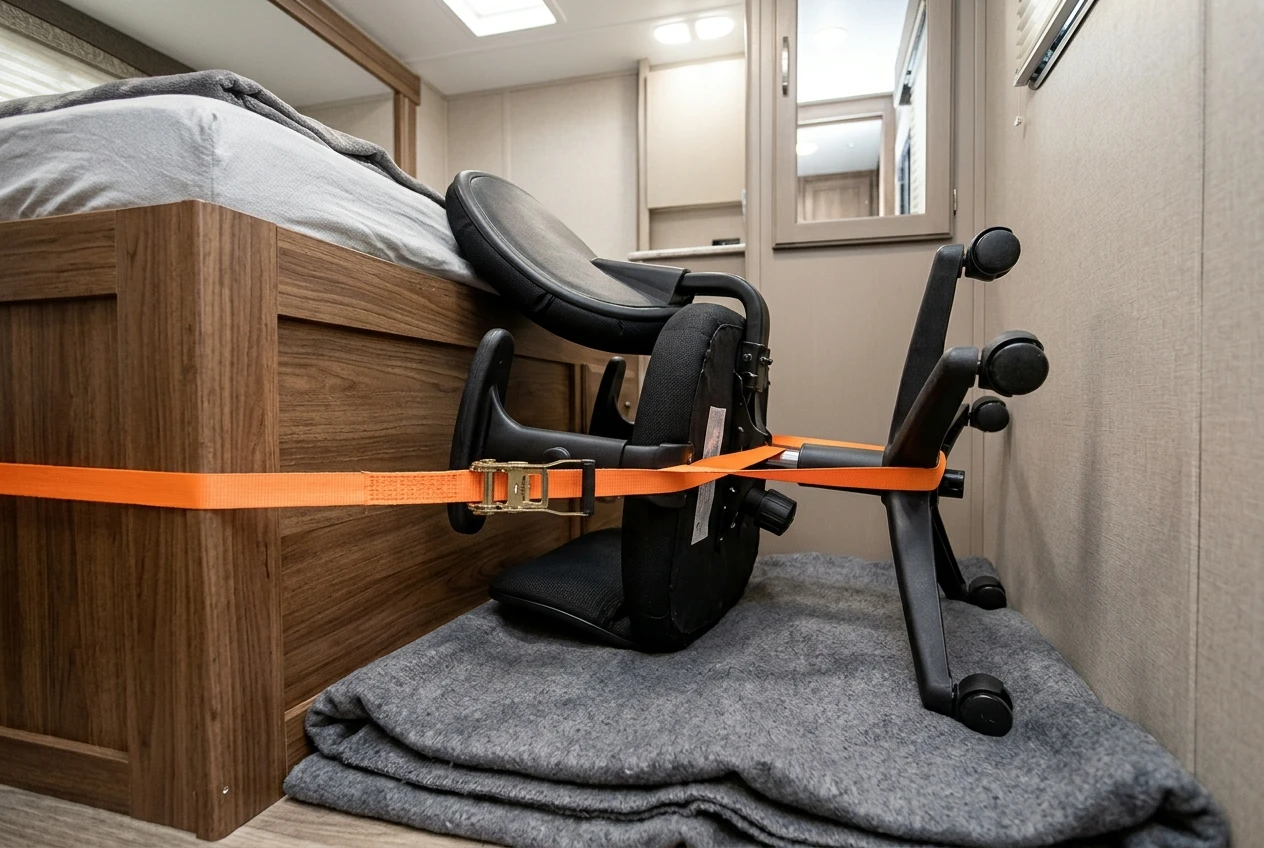
Common approaches:
- Fold or collapse it. Folding chairs and stools store flat, and a flat chair is easier to strap down.
- Take it apart. Many office chairs let you pull the base off the gas cylinder, and the casters often pull out of the base. Check the manufacturer’s instructions for how it comes apart, and see whether the pieces then fit your storage space.
- Strap it to a fixed point. Use ratchet or cam straps around a solid part of the rig, such as a bed frame or a built-in anchor point. Avoid cabinet doors, light fixtures, or trim that could fail.
- Wedge it in a protected spot. A shower stall or a bed can hold a chair, padded with blankets, as long as the chair cannot shift.
Keep it out of the cab and out of any exit path. Check the weight as well: you will be lifting the chair in and out, perhaps every few days. Product pages list the weight and the folded or boxed dimensions, so compare them against the storage measurement you took earlier.
Which chair type suits which RV layout
Layouts differ, so here is how the measurements usually point.
- Dinette with bench seating: A compact task chair with a small base and flip-up arms, used at the table in place of the bench, if there is floor room to pull it out. Where there is no room, a firm seat cushion and a lumbar support on the bench is the fallback, though it will not match a real chair.
- Built-in desk nook: A task chair with a short backrest, a small base, and removable or low armrests. Check the knee space under the desk before the armrests.
- Bedroom or bed-end workspace: A folding chair with a supportive back, or a stool with a back, because floor space is usually the biggest limit here.
- Slide-out with open floor: A full-size task chair may be possible, provided you can secure it on travel days. This is where a larger, more adjustable chair makes sense.
- Dedicated office space in a larger rig or fifth wheel: A standard ergonomic task chair, with the travel plan being the main concern.
If your numbers say two types would fit, choose the one that is easier to secure and lighter to lift. You will handle that factor far more often than you will use the extra adjustments.
Fixing what the chair can’t
Even the best office chair for full-time RV work cannot fix a table that is the wrong height or a screen that is too low. Three other items finish the setup.
Desk or table height. If the surface is too high, raise your chair and add a footrest. If it is too low, use a laptop stand and a separate keyboard so the surface itself matters less. Table risers or a portable lap-height desk are options when you cannot change the furniture.
Footrest. When your chair is raised to suit a high table, your feet need support, or your thighs press against the seat edge. A small adjustable footrest does the job and stores flat. A sturdy storage bin can serve temporarily.
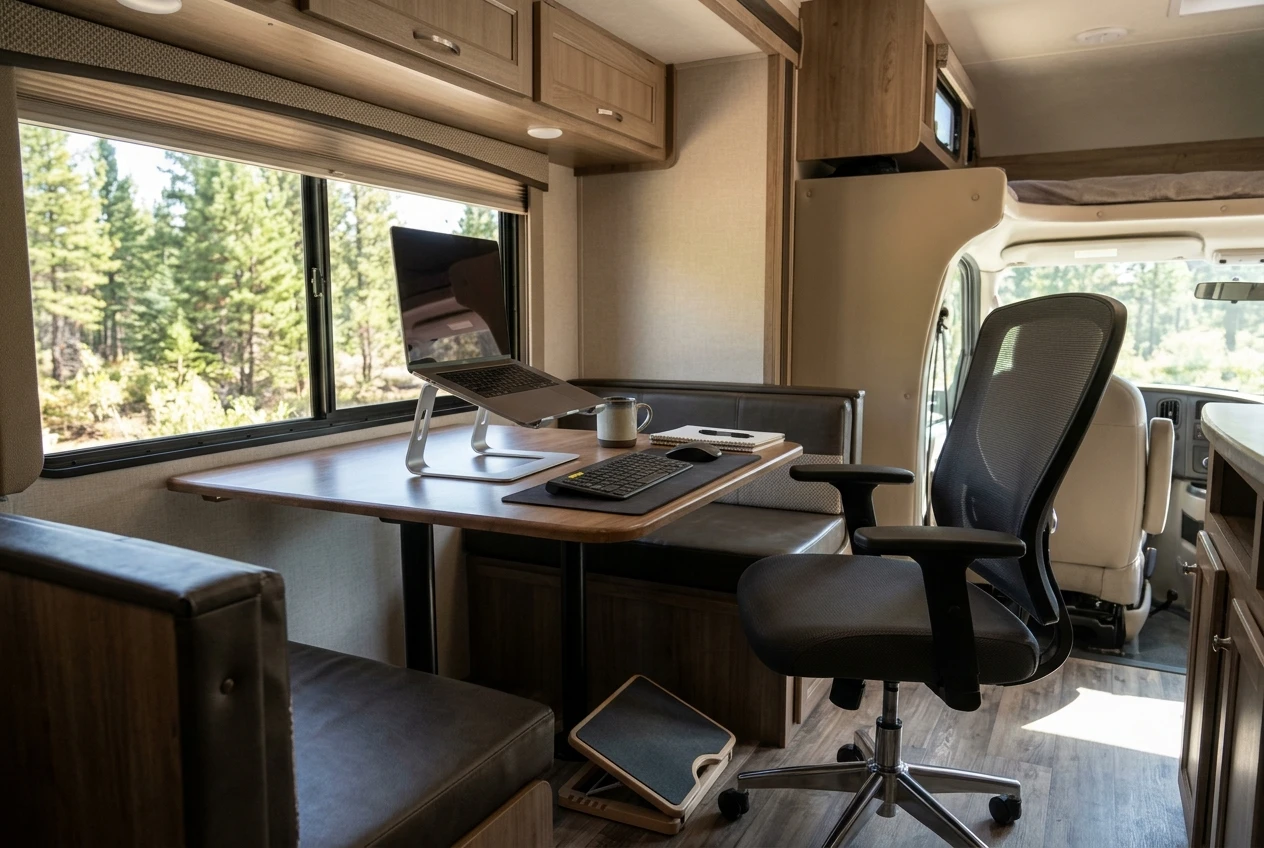
Screen position. The top of the screen should be roughly at eye level, about an arm’s length away. A laptop sitting flat on a table is too low, so put it on a stand and use an external keyboard and mouse. This usually helps your neck more than any chair change.
Keyboard and mouse height should let your elbows stay near your sides with your wrists straight. Adjust these after the chair, because the chair determines where your arms land.
A two-week test routine before you commit
A chair that feels fine for ten minutes can still hurt on the fourth hour of a workday. Two weeks of normal work gives you evidence rather than a first impression.
Before you buy, check the return policy. Make sure the return window is long enough to cover two weeks of use plus shipping time, and find out who pays for return shipping. Also consider where you will keep the box, since a large box takes up space in a small rig.
Week one:
- Set the chair to your measurements and work in it for your normal hours.
- At the end of each day, write down where you feel discomfort (lower back, neck, hips, wrists) and rate it from one to five.
- Note anything about the space itself: bumping into things, trouble getting in and out, the chair rolling.
- Do at least one full travel-day routine, securing and unsecuring the chair, so you know how long it takes and whether it works.
Week two:
- Change one adjustment at a time, such as seat height, lumbar position, or armrest height, and keep it for a full day before changing another.
- Add a footrest or screen stand if the notes show a pattern in your neck or feet.
- Compare week two’s ratings against week one’s.
At the end, decide using your notes. Keep the chair if discomfort has dropped, the space still works, and the travel-day routine is manageable. Return it if the same spot hurts after you have tried the adjustments, or if you dread the stowing routine. Standing and moving every 30 to 60 minutes helps with any chair. If pain persists or gets worse, talk to a healthcare professional.
You may also be interested in this article about creating an RV workspace that won’t wreck your back.
From Amazon, this chair gets high marks for comfort for many hours and is space saving.







Recent Comments